



Abstract
We describe a computer-assisted data collection system developed for a multicenter cohort study of American Indian and Alaska Natives. The Study Computer-Assisted Participant Evaluation System or SCAPES is built around a central database server that controls a small private network with touch screen workstations. SCAPES encompasses the self-administered questionnaires, the keyboard-based stations for interviewer-administered questionnaires, a system for inputting medical measurements, and administrative tasks such as data exporting, backup and management. Elements of SCAPES hardware/network design, data storage, programming language, software choices, questionnaire programming including the programming of questionnaires administered using audio computer-assisted self interviewing (ACASI), and participant identification/data security system are presented. Unique features of SCAPES are that data are promptly made available to participants in the form of health feedback; data can be quickly summarized for tribes for health monitoring and planning at the community level; and data are available to study investigators for analyses and scientific evaluation.
1. Introduction
While computer-assisted interviewing by telephone or in-person has been used for two decades for questionnaire-based data collection in epidemiologic research [1], most large cohort studies use postal, self-administered questionnaires (SAQ) that can be scanned and transported into a database [2]. The SAQ has the advantage of being the least expensive method of data collection although limitations exist, including requiring the questionnaires to be short and avoid complex skip patterns or branching [3]. Completion of a SAQ can also be a problem in populations unfamiliar with completing self-administered forms or where education levels are low or multiple languages are used by the study population.
As not all studies can collect questionnaire-based data using a traditional SAQ, they are faced with the challenge of finding a cost-effective alternative. However, as technology has changed, new methods of computer-assisted data collection have evolved giving researchers alternatives for cost-effective computerized data collection. The Internet has the ability to collect and transfer data in a secure manner and has become the industry standard for large, multicenter clinical research studies [4, 5]. In addition, web-based self-administered questionnaires are being used as an alternative to mailed SAQ in settings where high-speed Internet access exists [6, 7]. These methods, although well-suited to situations where only questionnaire data are collected, are less suitable to studies where other data components are required, such as the collection of blood samples, anthropometric data, blood pressure, or other medical measurements. Furthermore, in remote areas access to high-speed Internet connections may be limited.
This paper describes the rational and design of the Study Computer-Assisted Participant Evaluation System (SCAPES), a computer-assisted data collection system that was developed to collect and manage all study data in a cohort of American Indians and Alaska Natives (AIAN), although it has applications in other studies and settings. SCAPES has been used to collect study data in remote villages in Alaska and rural communities in the plains and southwestern United States. Unique features of SCAPES are that data are promptly made available to participants in the form of health feedback; can be quickly summarized for tribes for health monitoring and planning at the community level; and are available to study investigators for analyses and scientific evaluation.
2. Background
American Indian and Alaska Native communities experience a greater burden of chronic diseases than other racial/ethnic minority populations [8–11], but have generally not been included in large cohort studies [12]. Understanding chronic disease development in AIAN populations may help alleviate existing health disparities, but data collection in AIAN populations has many challenges including lack of trust of established medical institutions and a heterogeneous often hard-to-reach population residing in rural and urban areas widely dispersed across the United States [13]. The Education and Research Towards Health (EARTH) study is a multicenter study funded to develop methods to collect and disseminate valid data within a cohort of American Indians and Alaska Natives. Detailed information on study components are described elsewhere [12]. Briefly, EARTH study participants were 18 years of age or older; self-identified as American Indian or Alaska Native; could give informed consent; understood English or one of the tribal languages included in the study; and were eligible to receive care at the Indian Health Service (IHS). The baseline study visit consisted of informed consent, interviewer-administered intake questionnaire, medical measurements, an audio computer-assisted self-interview (ACASI) diet history questionnaire (DHQ), an ACASI health and lifestyle questionnaire (HLPA), an interviewer-administered exit interview, and individual feedback (health report to each participant at the conclusion of the study visit). The medical measurements included seated blood pressure, height, weight, waist and hip circumference measurements, and serum lipid and glucose levels obtained via a finger stick blood sample. Participants were asked to fast for nine hours.
The study consisted of three field centers and one coordinating center. Each field center had both permanent and temporary data collection sites. Study wide there were six permanent data collection sites, three mobile data collection units, and numerous temporary data collection sites located in existing community buildings in remote villages or rural communities. SCAPES and the field center tracking system interface were developed and programmed by the coordinating center located at the University of Utah.
Tribal partnerships were established at all field collection sites and the study was approved by all participating tribes and their respective Institutional Review Boards (IRB) along with the IHS IRB, the University of Utah IRB, and the University of New Mexico IRB. Additionally, regional and local health boards approved and supported the study. SCAPES planning and programming started in November, 2002. Data collection using SCAPES began in March, 2004.
3. Design Considerations
The study was designed to enable multiple participants to complete the baseline study visit at the same time at permanent study field centers, in mobile units, or temporary study visit sites located in remote villages or rural communities. Key design considerations were the need for usability/ease of use for staff and participants, multiple interview languages, multiple participants completing the study visit at the same time, navigation between study visit components and enforcement of component order, ease of medical measurement data entry, the monitoring of fasting times, and the inclusion of pictures and audio files as part of the interview. A detailed description of all individual components of the EARTH study and design considerations are listed in the supplemental files, Appendix 1.
In planning and designing, elements of hardware/network design, data storage, programming language, software choices, participant identification/data security, and specific hardware requirements were considered in order to meet these key design considerations as well as the overall administrative tasks listed in Table 1. Three additional considerations needed to be incorporated into the design: (1) long-term support for a computer package was necessary as data would be collected for many years; (2) ability to collect data in remote locations that were not guaranteed to have Internet access; and (3) ability to collect data in sites that required transport of all study equipment via surface roads, small airplane, or ferry from the field center to mobile clinics.
Table 1.
SCAPES system design considerations for EARTH Study administrative tasks
| Administrative task | Purpose | Special considerations | Program requirements |
|---|---|---|---|
| Track study participants | Track study participants during the study visit and enforce study visit component order | Avoid repeated keying of participant ID's, provide data confidentiality and security, allow for return visits, interface with several center-specific tracking systems, allow for practice and certification participants who are not part of the study | Security, durability |
| Data storage and export | Data storage and export | Easy backups, ability to restore data, guard against hardware failures | Convert data to user readable format, archive exported data |
| Data security | Provide data security | Demographic and other data stored in a manner that does not allow linking by all staff except those with high security level | Separate database user containing SID/TID links only available to administrators |
| Update and maintain SCAPES | Ability to update program and assist programmers with field debugging | Ease of use by field staff, separate server and client updates | |
| Employee management | Ability to add and remove staff as well as establish differing security levels | ||
| Staff training | Allow staff to be trained to use SCAPES | Allow for practice and certification participants who are not part of the study |
SID = participant SCAPES ID
TID = participant tracking system ID
Several commercial survey administration software packages were also evaluated for use in the EARTH study. At study inception none of the available packages offered the needed combination of a rich customizable user interface and sophisticated multimedia handling. Additionally, many packages still require a shell or master application to control launching of the survey instruments. It was therefore decided to develop all of the data collection software in house.
4. System Description
SCAPES tracks a study participant through the study visit, including administering all study questionnaires, displaying the fasting status for lipid and glucose measurement as reported at the intake interview, printing forms for medical measurements, inputting the medical measurements, and printing the participant feedback, as well as having administrative functions, e.g., smart card management, data export, or data backup as shown in Fig. 1.
Fig. 1.
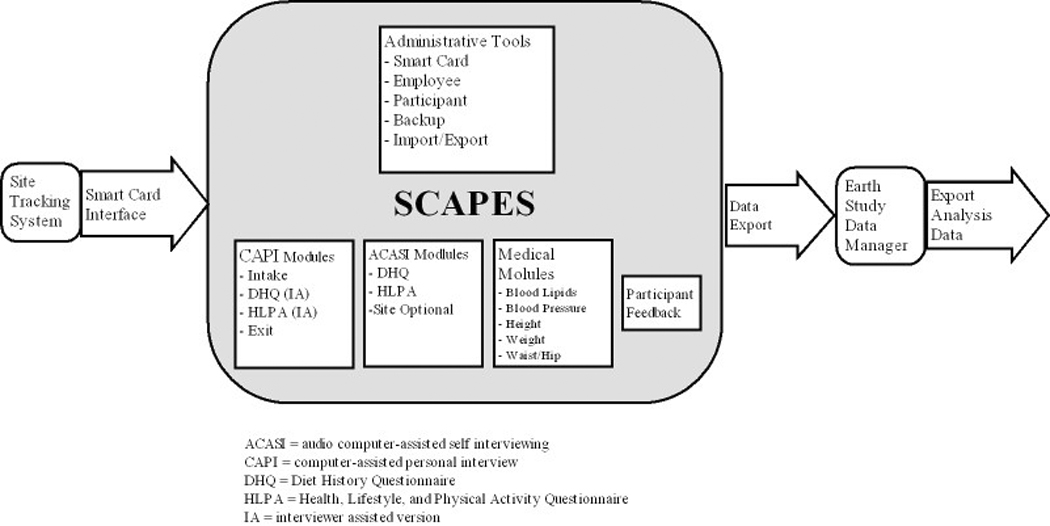
EARTH Study data flow chart including the internal components of SCAPES, the bridge application, i.e., smart card interface, that communicates with the field center tracking systems, and the flow of data after it is exported from SCAPES.
4.1 Hardware requirements
SCAPES is built around a central database server. This server controls a small private network with touch screen workstations used for the self-administered questionnaires and keyboard-based stations for the interviewer-administered questionnaires and inputting medical measurements. These workstations also can be used to carry out administrative tasks. This design was chosen to meet many of the data collection requirements including multi user and mobile operation. By specifying a client-server structure, robustness and redundancy could be focused on the server and hardware could be specifically optimized for fixed or mobile use. For instance mobile servers were typically thin rack mount types that could be more easily transported. While the EARTH study used Microsoft Windows for the operating system platform, software used for the project could be deployed on most current operating systems including UNIX and LINUX. The hardware specifications for SCAPES are listed in supplemental files, Appendix 2.
Mobile study visit sites can use wireless networking where appropriate. Laptops also can be used in place of desktop personal computers (PCs). Printers are specified at workstations as needed. A universal power source (UPS) is specified for each workstation, but is only required for the server. If the power goes down, it is critical that the database server be protected.
4.2 Software
SCAPES was developed using the Java programming language. The Java language runs within a runtime environment (JRE) that is installed on the host operating system. JRE implementations are available for nearly all operating systems and for a wide variety of computing devices. Since Java is “write once, run anywhere”, it can be deployed on web-based or portable devices in the future on different operating systems if needed. Java also facilitates interaction with databases through its Java Database Connectivity (JDBC) specification. This made database queries and calls to procedures embedded in the database easily manageable.
Data storage required a robust system that would allow for easy backups and restores as well as minimizing data loss in the event of program or hardware failure. Both custom file-based storage as well as commercial database solutions were considered. A commercial RDBMS system was chosen because of the superior robustness, data safety and data management capabilities. Use of a database server also meets the design consideration of a safe multi user environment in that all participant management and questionnaire delivery is centrally controlled and transaction based. Although cost was an issue for some participating centers, Oracle RDBMS was chosen for the underlying data storage. Oracle is also available for most popular operating systems.
The Java application software consists of a central control interface “wrapper shell” and various data collection modules. The wrapper shell controls participant movement through the study visit in two ways: 1) the participant’s progress is tracked by the database and the wrapper indicates what station to visit next and shows a progress bar and 2) the participant’s navigation through the study visit is controlled so the various data collection modules launch according to the study protocol. For example all components must be completed or refused before the exit questionnaire can be launched. The wrapper also provides needed administrative tasks. As SCAPES may be run on touch screen computer without keyboards or mice all program control was done via push buttons and screen keypads so there are no user menus.
4.3 Questionnaire programming
Questionnaire control and the export of questionnaire data operations are controlled by PL/SQL (Oracle’s procedural extension to industry-standard SQL) procedures stored in an Oracle database. The program design not only provides proper instrument logic capabilities, but properly handles potential “backed over” data. This occurs when a participant backs up to a previous question and changes an answer. This may take them through a different questionnaire “path” that skips over a question that has already been answered, rendering the answer meaningless. A PL/SQL database procedure was developed to validate the questionnaire path after each answer and mark it as backed over if it is no longer on the valid path. Any backed over data (answers) is then discarded during an export. The procedure does this by evaluating the instrument path with current answers and setting a state for each question. Valid states include never visited, answered on a currently valid path, and answered but no longer on a valid path and therefore currently invalid.
The actual questionnaires are controlled by tables in the database facilitating a modular structure. A new instrument is built when new participants are enrolled by manipulating database tables that the Java code uses to dynamically execute the instrument. If a participant quits a questionnaire and restarts, they will return to the question where they left off. The database also contains instrument logic that the program evaluates when participants enter or exit a question and can be based on either static conditions such as sex or age, or dynamic conditions when answers to previously answered questions dictate the next question.
Seven screen types were developed for the study question types and all questions had to adhere to one of the screen types:
1) Informational text only with no data input (Fig. 2)
2) Categorical answer selections with either single or multi select (Fig. 3);
3) Open format input box for interviewer administered sections (Fig. 4);
4) Numeric input with a screen keypad and optional additional modifier button choices (Fig. 5);
5) Custom screen for physical activity data collection (Fig. 6);
6) Custom screen for diet history data collection with food pictures for portion selection (Fig. 7); and
7) A custom panel for searching and selecting data from large lists (Fig. 8).
Fig. 2.

SCAPES informational question type screen design. The informational screen contains informational text only and requires no data input.
Fig. 3.

SCAPES categorical question type screen design. The categorical screen has a variable number of categorical answer selections with either single or multiple (select all that apply) selection options.
Fig. 4.

SCAPES text input question type screen design. The text input question screen has an open format input box for interviewer-administered sections. It features formatting and key capture for input of phone, date, or other format specific input.
Fig. 5.

SCAPES numeric input question type screen design. The numeric input question screen has a screen keypad and optional modifier button choices. It features range checks for invalid numeric input.
Fig. 6.

SCAPES physical activity question type screen design. The physical activity input question screen has up/down push-buttons and hour and minute selection options. It features range checks for invalid or unreasonable input. While the screen contains three questions, the second question appears only after the first question is answered and the third after the second question is answered.
Fig. 7.

SCAPES diet history question type screen design. The diet history input question screen has food pictures for portion selection. It features range checks for invalid or unreasonable input. While the screen contains three questions, the second question appears only after the first question is answered and the third after the second question is answered.
Fig. 8.

SCAPES search list question type screen design. The search list question screen is a custom screen used for searching and selecting an answer from a long list. It has the ability to search on a local, regional, or national level.
4.3.1 Self-administered questionnaires
Programming for the audio computer-assisted self-administered interview (ACASI) was done so that all data input can be performed with buttons on a touch screen computer. Each screen has a Back, Next, and Quit button as well as a Language toggling and a context sensitive Help button. (See Fig. 3 for an example.) The ACASI questionnaires read the questions to the participants via the use of headphones. A full audio subsystem is implemented using Java Media Framework along with audio timers and reminders. Multiple language capabilities are available for the audio. The time length of each question audio is pre-calculated and stored in the database for implementation of the reminders and replays. Question specific help is available for each question to assist participants with information such as more detailed information on foods and physical activities or detailed definitions of medical conditions. The development, usability, and acceptability of the ACASI questionnaires has been described elsewhere [14].
4.3.2 Interviewer-administered questionnaires
Interviewer-administered questionnaires are written for the intake and exit components of data collection. While the Diet History Questionnaire (DHQ) and Health, Lifestyle, and Physical Activity (HLPA) questionnaire are primarily self-administered, they can also be interviewer-administered for participants who do not read English. Multiple language capabilities are available for the text for all questionnaires. Since the tribal languages used in the study were Athabascan languages that use non-ASCII characters, Unicode font support is included so any custom character can be rendered. A separate questionnaire loader application was developed to input question text, answer categories, multimedia content, help text, and long, external answer categories lists, e.g., list of federally recognized tribes or IHS facilities.
4.4 Medical measures programming
Due to the nature of medical tests in the study the data input modules were custom built. We investigated electronically downloading data from the electronic digital scales and blood lipid profile machines. After testing, it was determined that proprietary interfaces and the potential for software changes in the machines negated any potential advantages, especially since other measurements would have to be manually entered. SCAPES was developed to print forms for recording measurement data for entry while the participant was doing one of the self-administered touch screen modules.
4.5 Participant feedback programming
The participant feedback component of the study visit was programmed to output data from the medical measures, DHQ, and HLPA into an individualized report based on criteria developed by study investigators. A PL/SQL database procedure builds the report and stores it in Adobe PDF format for future reprinting. The report is printed from SCAPES after the exit questionnaire is completed. An example of the four page participant feedback report is contained in the supplemental files, Appendix 3.
4.6 ID management
ID management is an important component in the operation of SCAPES. It allows for participants to go from computer to computer during a study visit, automatic entry of ID in order to prevent data entry errors, and tracking of participant progress in order to enforce study visit component order. Additionally, it allows for confidentially of the data by using different IDs for storing study visit data, which is stripped of any identifying information, and tracking information used to contact study participants.
SCAPES uses smart cards for ID management and security. Smart cards are the size and shape of credit cards and contain portable integrated devices that store and process data. The security, durability, and cost of smart cards led us to choose this technology for participant identification during the study visit [15]. Participant recruitment and tracking was unique in each center participating in the EARTH study. Therefore each center developed their own participant tracking system separate from SCAPES where demographic and contact information was stored. A separate application to program the smart card acts as the front end bridge to SCAPES that communicates basic demographic information and the participant’s tracking system ID from the center-specific tracking system to SCAPES. After the intake component of the study visit is completed, SCAPES deletes the tracking system information and writes a SCAPES ID (SID) on the smart card, which the participant keeps with him/herself throughout the study visit. Each employee has a smart card containing the employee ID (EID) and their administrative security level which determines their ability to use the administrative tools in SCAPES. All information on the smart card is encrypted. SCAPES uses the participant smart card to track study participants through the study visit, registering when they start and stop each component. The participant smart cards are cleared at the exit interview. The cleared participant cards are collected and reused.
4.7 Operation of SCAPES
All SCAPES applications are launched from the Root screen (Fig. 9). The screen is divided into two sections, one that launches the different components of the study visit and another that launches the administrative interface, with Exit SCAPES and About SCAPES buttons at the bottom of the screen. An employee card is required to start the administrative interface or to exit SCAPES. An employee and participant card are required to start any component of the study visit.
Fig. 9.

Screenshot of the SCAPES Root screen.
When SCAPES is started on the touch screen kiosks, it opens to the self-administered questionnaire screen instead of the Root screen since they typically have no keyboard or mouse. This screen simply prompts for a participant card to begin the appropriate instrument. In this mode inactivity timeouts will close the questionnaire and return to the participant card prompt. Staff can access the Root screen using an employee smart card.
4.7.1 Study visit screens
The study visit components accessed by buttons on the Root screen are: Intake/Exit, Self-Administered, Interviewer-Administered, Medical, and Check Participant Progress. After a button is selected, SCAPES has prompt screens that instruct the staff to insert the appropriate smart card.
The Intake/Exit button launches the intake or the exit questionnaire. If the participant smart card indicates that this is a new participant, the intake questionnaire will open; if the participant has finished all of the other study visit components, the exit questionnaire will open. The exit questionnaire will not open unless all other study components have been completed or refused. The participant feedback is generated and printed at the exit interview.
The Self-Administered and Interviewer-Administered buttons launch either the DHQ or the HLPA in either the self or interviewer-administered mode. As the DHQ has to be administered before the HLPA, SCAPES determines which questionnaire should be administered.
The medical screens are accessed from the Blood Lipids/Medical button on the Root screen. A form for each medical measurement can be printed from SCAPES. While the medical measurements can be entered directly into SCAPES, study designers felt that paper forms were necessary as the SCAPES entry screen might not be located close enough to the medical measurement areas so it was still handier to record values and other information on a paper form. Double data entry of all measurements into SCAPES is required. Out-of-range values cannot be entered.
The Check Participant Progress button goes to the Participant Progress screen that indicates the status of a participant for each component of the study visit (Fig. 10). Study components are listed on the top of the screen and are marked with a green check mark when completed, a red X when refused, the word partial when they have been started but not completed, and are not marked when not started. If a component is selected that the participant is not ready for, such as length of fasting time is less than amount needed for the blood test, SCAPES will indicate which component the staff should take the participant to next.
Fig. 10.

Screenshot of a SCAPES Participant Progress screen.
4.7.2 Administrative functions
The Administrative button is the Root screen button for launching various administrative tools. This screen is divided into five tabbed areas: 1) Card Utilities, 2) Participant Utilities, 3) Daily Utilities, 4) Paper Validation, and 5) Error Log. Fig. 11 shows an example of an Administrative Function screen. The Card Utilities tab has buttons that will: create practice, certification, and courtesy participant smart cards; read a smart card; clear a smart card; and create or change an employee smart card. The Participant Utilities tab allows staff to reprint the feedback, update the fasting time, and change the default language for a participant. The Daily Utilities tab has buttons that: perform the daily backup of the data, export data to the field center tracking system, export data to the study data manager, export the error log for debugging purposes, and checks the server clock as time and date calculations in SCPAPES require an accurate clock. The Paper Validation tab is used for participants chosen to participate in a separate validation study of the diet history and physical activity portions of the questionnaires. The Error Log tab allows field staff to view computer system error logs on site in order to assist in program debugging.
Fig. 11.

Screenshot of the SCAPES Administrative Tools screen.
4.8 Program deployment and updates
SCAPES is deployed in server and client pieces. Clients are installed using a standard installer that sets up the JRE and media framework, the SCAPES program, and the audio files. A separate server utilities is installed on the server that sets up the SCAPES database after Oracle has been installed. Program updates are also client and server specific. The server utilities program performs database updates while clients are updated with a self extracting zip file that installs the newest program version and any audio file updates. Both the database and clients check for proper version on startup and prompt the user for incompatibilities.
4.9 Staff training
All staff members were required to be certified in order to conduct study visits. This certification included completion of standardized training requirements, practice completing all components of the study visit including using SCAPES, and conducting two study visits using SCAPES while being observed by the study quality control coordinator. Staff were given extensive feedback between the first and second certification study visit and an additional certification study visit was required if performance did not meet standards. All staff members were observed each quarter conducting two study visits by the study quality control coordinator. In order to allow for certification and practice using SCAPES, smart cards can be issued from the Card Utilities tab on the Administrative Tools screen. Practice and certification study visits have different SID’s and are marked as such in the data.
4.10 Data storage
Data is stored on a robust system that allows for easy backups, has the ability to restore data if needed, and guards against hardware failure. The Oracle relational database management system or RDBMS is used because of its robustness, data safety, and data management capabilities.
Since the database stores the questionnaire data and also controls the execution of the questionnaires, internal data are not in a user friendly format and cannot be readily imported into spreadsheet or statistical programs. Therefore, a separate data manager application and data codebook facilitate exporting comma delimited files for use with programs that cannot directly import files from Oracle and internally archives the exported files. The data manager application also assists in controlling data flow to the coordinating center.
4.11 Data security and safety
Participant confidentiality is a vital aspect of SCAPES. SCAPES protects participant confidentiality by: 1) requiring a participant and employee smart card to run any of the study visit components, 2) encrypting all information stored on employee and participant smart card, 3) requiring employee smart cards for access to administrative functions, 4) password protection of user data, 5) use of anonymous internal SIDs helps provide data security, and 6) leveraging built in security of the Oracle database. All exported data is divided between anonymous data tied to SIDs and data with identifiers which is exported separately and tied to participant tracking system IDs (TIDs) that sites can use to update participant tracking systems.
Several mechanisms are provided for data safety. The first line of defense in data safety is provided by the Oracle database. Since data are posted after each question, a client crash will only cause loss of current question data. Oracle is also highly robust and reliable and provides several mechanisms for backup and recovery. Additionally, a daily backup of non-static database tables is saved on a rewritable compact disc (CD-RW) or universal serial bus (USB) memory key that is stored in a water and fire-proof media safe. Servers are specified to have mirrored, redundant array of independent disks (RAID) level 1, disk drives to protect against hard disk failures.
4.12 Costs
The cost of designing, programming, and operating a computer-assisted data collection system are different than the costs for a paper based distribution system [16]. Computer-assisted data collection requires extensive up-front time for design, development, and testing, but does not have costs associated with data entry, duplicating, shipping, and storage. The upfront staff time for SCAPES involved 2.5 programmers working over 15 months, 1 full time research associate, one full time survey specialist, 0.25 graphic designer, and 0.25 nutritionist. This time includes developing, conducting usability tests, modifying, and testing the ACASI questionnaires, and developing and programming the tracking system in addition to developing and testing SCAPES.
5. Status Report
To date about 16,000 participants have completed the EARTH study visit using SCAPES. As data are immediately available after a study visit is completed, the study has been able to give feedback to participants and communities in a timely manner. Because feedback to communities and participants is an important study objective, SCAPES has been essential in meeting this study objective. SCAPES has allowed the study to collect data in remote locations without Internet access. The system has been transported by airplane and boat as well as ground transportation and has been deployed in mobile study visit sites using trailers, vans, and motor homes in order to collect data in remote locations. This has allowed individuals to be included in the EARTH Study that may have otherwise been left out. The system has also proven to be a valuable way to track study participants through the study visit as well as to collect questionnaire and medical data. While the upfront time and expense were substantial, we believe that using SCAPES was a cost-effective method to collect data in a prospective study such as the EARTH Study.
6. Lessons Learned
6.1 Challenges and solutions
There have been a number of challenges in the design, implementation, and use of SCAPES. Many of these challenges are similar to those described by Abdellatif and colleagues [17]. They are: defective hardware (both before and during data collection), accommodating protocol changes (both before and during data collection), and changes in medical values that includes changes in the machine hardware and software. We did not encounter the challenges related to staff turn over and training reported by the authors due to our quality assurance protocol for staff training and certification and our extensive ongoing quality control protocol.
We had a few additional challenges. The testing of SCAPES was extremely complicated due to the length, number of versions, and complexity of the questionnaires. The audio files also had to be checked for the ACASI questionnaire. Other challenges were testing in languages that the staff at the coordinating center did not understand and some field centers wanted at add additional center-specific data collection modules to the study visit.
The problems with defective hardware were mostly encountered after data collection had started. The most common hardware failure was with the touch screen panels. Field centers were encouraged to keep an extra touch screen and touch screen power supply as this was the most common hardware failure. Spare smart card readers and keyboards were also kept on hand by some field centers.
As protocol changes made during development can delay going in the field, final SCAPES programming was not done until the protocol was finalized although work on the “wrapper” and on modules for specific protocols started as they were finished versus waiting for the entire protocol to be completed. This did cause more “up front” time and resulted in a somewhat longer “lag” between the questionnaires and other protocols being finalized and start-up of data collection. One field center opted to start data collection on paper due to the delay in start-up. Most of the protocol changes made during data collection were very minor and did not involve additional SCAPES programming.
The changes in blood pressure and blood lipid machine models and machine software resulted in reprogramming a data collection form and adding the tracking of specific machines in SCAPES after data collection started. This allowed for changes in the way values were calculated to be tied to a machine versus the medical measure.
Conducting testing that will identify all problems before going in to the field is always a challenge. Questionnaire testing was done by checking the text of the screen to a hard copy of the questionnaire. The same was done for the audio. Questionnaire paths were checked to make sure the skip patterns were properly programmed. Reminders and range checks were tested. Test medical data was entered for all medical measures. The initial training session also served as a beta test of the system as during the training the staff had to complete a practice and certification study interviews. One field center started data collection before the universal release as a dress rehearsal.
Center specific modules had to conform to the established question types and be programmed by the coordinating center since the application that would allow users to develop and enter custom survey modules was not complete at deployment.
7. Future Plans
While SCAPES has been used in the field to collect data for over three years there are areas where we would like to continue development. An important feature is to finish an application to allow users to develop and enter survey instruments. This feature is written with basic functionality, but it still needs additional development to allow users to easily enter questions and answers in both text and audio. This would allow greater flexibility of including multiple modular units or questionnaires into SCAPES.
Additionally, it would be desirable to have the instrument available to web-based deployments. This was considered initially and is one of the reasons for using the Java programming language. The survey modules could be easily ported to web applets, or with additional work the user interface could be converted to Java server pages with the functional code residing on an application server in a server oriented architecture (SOA). We were satisfied with the choice of Java and Oracle. We would make the same choice again if no currently available software package fulfilled our requirements.
Supplementary Material
Acknowledgements
This study was funded by grant CA 088958 from the National Cancer Institute.
We would like to acknowledge the contributions of Joan Benson, Mindy Pearson, the EARTH Study Principal Investigators and Co-Investigators, and the staff at the EARTH Study field centers to this project.
The contents of this manuscript are solely the responsibility of the authors and do not necessarily represent the official view of the National Cancer Institute.
Footnotes
Publisher's Disclaimer: This is a PDF file of an unedited manuscript that has been accepted for publication. As a service to our customers we are providing this early version of the manuscript. The manuscript will undergo copyediting, typesetting, and review of the resulting proof before it is published in its final citable form. Please note that during the production process errors may be discovered which could affect the content, and all legal disclaimers that apply to the journal pertain.
Conflict of interest: none declared.
References
- 1.Birkett N. Computer-aided personal interviewing. A new technique for data collection in epidemiologic surveys. 1988;127:684–690. doi: 10.1093/oxfordjournals.aje.a114843. [DOI] [PubMed] [Google Scholar]
- 2.White E, Hunt JR, Casso D. Exposure Measurement in Cohort Studies: The Challenges of Prospective Data Collection. Epidemiologic Reviews. 1998;20:43–56. doi: 10.1093/oxfordjournals.epirev.a017971. [DOI] [PubMed] [Google Scholar]
- 3.Dillman DA. Mail and Telephone Surveys: The Total Design Method. New York, NY: Wiley; 1978. [Google Scholar]
- 4.Winget M, Kincaid H, Lin P, Li L, Kelly S, Thornquist M. A web-based system for managing and co-ordinating multiple multisite studies. Clinical Trails. 2005:42–49. doi: 10.1191/1740774505cn62oa. [DOI] [PubMed] [Google Scholar]
- 5.Marshall W, Haley R. Use of a Secure Internet Web Site for Collaborative Medical Research. JAMA. 2006;284:1843–1849. doi: 10.1001/jama.284.14.1843. [DOI] [PubMed] [Google Scholar]
- 6.Cooper C, Cooper S, Junco Dd, Shipp E, Whitworth R, Cooper S. Web-based data collection: detailed methods of a questionnaire and data gathering tool. Epidemiologic Perspectives & Innovations. 2006;3 doi: 10.1186/1742-5573-3-1. [DOI] [PMC free article] [PubMed] [Google Scholar]
- 7.Balter K, Balter O, Fondell E, Lagerros Y. Web-based and mailed Questionnaires: A Comparison of Response Rates and Compliance. Epidemiology. 2005;16:577, 579. doi: 10.1097/01.ede.0000164553.16591.4b. [DOI] [PubMed] [Google Scholar]
- 8.Castor ML, Smyser MS, Taualii MM, Park AN, Lawson SA, Forquera RA. A nationwide population-based study identifying health disparities between American Indians/Alaska Natives and the general populations living in select urban counties. Am J Public Health. 2006;96:1478–1484. doi: 10.2105/AJPH.2004.053942. [DOI] [PMC free article] [PubMed] [Google Scholar]
- 9.Denny CH, Holtzman D, Goins RT, Croft JB. Disparities in chronic disease risk factors and health status between American Indian/Alaska Native and White elders: findings from a telephone survey, 2001 and 2002. Am J Public Health. 2005;95:825–827. doi: 10.2105/AJPH.2004.043489. [DOI] [PMC free article] [PubMed] [Google Scholar]
- 10.Doshi SR, Jiles R. Health behaviors among American Indian/Alaska Native women, 1998–2000 BRFSS. J Womens Health (Larchmt) 2006;15:919–927. doi: 10.1089/jwh.2006.15.919. [DOI] [PubMed] [Google Scholar]
- 11.Liao YL, Tucker P, Giles WH. Health status among REACH 2010 communities, 2001–2002. Ethn Dis. 2004;14:9–13. [PubMed] [Google Scholar]
- 12.Slattery ML, Schumacher MC, Lanier AP, Edwards S, Edwards R, Murtaugh MA, Sandidge J, Day GE, Kaufman D, Kanekar S, et al. A Prospective Cohort of American Indian and Alaska Native People: Study Design, Methods, and Implementation. Am J Epidemiol. 2007:kwm109. doi: 10.1093/aje/kwm109. [DOI] [PMC free article] [PubMed] [Google Scholar]
- 13.Davis SM, Reid R. Practicing participatory research in American Indian communities. Am J Clin Nutr. 1999;69:755S–759S. doi: 10.1093/ajcn/69.4.755S. [DOI] [PMC free article] [PubMed] [Google Scholar]
- 14.Edwards SL, Slattery ML, Murtaugh MA, Edwards RL, Bryner J, Pearson M, Rogers A, Edwards AM, Tom-Orme L. Development and Use of Touch-Screen Audio Computer-assisted Self-Interviewing in a Study of American Indians. Am J Epidemiol. 2007;165:1336–1342. doi: 10.1093/aje/kwm019. [DOI] [PubMed] [Google Scholar]
- 15.Kardas G, Tunali ET. Design and implementation of a smart card based healthcare information system. Computer Methods and Programs in Biomedicine. 2005;81:66–78. doi: 10.1016/j.cmpb.2005.10.006. [DOI] [PubMed] [Google Scholar]
- 16.Christiansen D, Hosking JD, Dannenberg A, Williams O. Computer-Assisted Data Collection in Multicenter Epidemiologic Research. Controlled Clinical Trails. 1990;11:101–115. doi: 10.1016/0197-2456(90)90004-l. [DOI] [PubMed] [Google Scholar]
- 17.Abdellatif M, Reda DJ. A Paradox-based data collection and management system for multi-center randomized clinical trails. Computer Methods and Programs in Biomedicine. 2004;73:145–164. doi: 10.1016/s0169-2607(03)00019-1. [DOI] [PubMed] [Google Scholar]
Associated Data
This section collects any data citations, data availability statements, or supplementary materials included in this article.