


Abstract
To meet the educational needs of a medical imaging department with a strong teaching commitment, a teaching file that uses digital data supplied by the institutional picture archiving and communications system (PACS) was required. This teaching file had to be easily used by the end users, have a simple submission process, be able to support multiple users, be searchable on all data fields, and implementing the teaching file must not incur any additional software or hardware costs. The teaching file developed to address this problem takes advantage of the database structure and capabilities of several components included in the commercial PACS installed at the hospital. MS Access is used to seamlessly integrate with the digital imaging and communication in medicine (DICOM) database of a normal work station that is part of the PACS. This integration allows relevant patient and study demographics to be copied from images of interest and then to be stored in a separate database as the back-end of the digital teaching file. When images for a particular teaching file case need to be reviewed, they are automatically retrieved and displayed from the main PACS database using an open application programming interface (API) connection defined on the PACS web server. Utilizing this open API connection means the teaching file contains only the relevant demographic information of each teaching file case; no image data is stored locally. The open API connection allows access to imaging data usually not encountered in a teaching file, allowing more comprehensive imaging case files to be developed by the radiologist. Other advantages of this teaching file design are that it does not duplicate image data, it is small allowing simple ongoing backup, and it can be opened with multiple users accessing the database without compromising data access or integrity.
Key words: Electronic teaching files, DICOM, PACS
Introduction
The introduction of a picture archiving and communications system (PACS) in a public teaching hospital leads to a number of changes in productivity and workflow. One of these changes is the necessity to move from traditional film and light-box teaching files to a system that can take advantage of digital media and can deal with the large datasets now being produced by modalities such as magnetic resonance imaging (MRI) and computed tomography (CT). It has been reported that none of the PACS vendors have developed a commercial option that satisfactorily meets the needs of a digital teaching file.1 As such, many institutions have developed their own solutions or have used a stand-alone product that resides outside the scope of the PACS. The ad hoc solutions are comprised of a variety of solutions ranging from simple spreadsheets2,3 to PC servers acting as digital imaging and communication in medicine (DICOM) receivers which host the teaching file database running in conjunction with a web server.4,5
One particular solution described by Ernst et al.6 uses a common DICOM viewing and storage program both as a DICOM receiver and as the core database of the teaching file. By using MS-Access, the database can be viewed, and extra items such as final diagnosis can be added or edited. There are three inherent problems with this design. The first is the duplication of image data. If a secondary DICOM device is used in conjunction with a larger PACS, it will provide a duplication of image data already stored. The volume of this data will grow very quickly in size and would provide a substantial issue with regard to backup and maintenance. The second problem is that this design supports only single user access. The issue of single user access in a large teaching hospital is significant. Single user access limits the ability to input new cases or review the database for teaching purposes. These activities could only be completed if no one else is using the system. In the long term, this would be a severe limitation on the utilization of the teaching file. The third problem with this design is the lack of access to the full patient imaging history. Many patients with pathologies of interest have an extensive digital imaging history, and limiting a teaching file case to a few images of interest does not allow the user of the teaching file to fully review imaging of patient if desired.
However, a very appealing aspect of using a DICOM receiver integrated with a teaching file database is that by using a DICOM send of the specific images of interest, a mechanism can be set up that automatically allows access to important patient demographic fields providing accurate record keeping for the teaching file database. This DICOM send process can be easily integrated into the reporting radiologists workflow, allowing the radiologist to include the initial identification of scans of interest in their normal day-to-day activities. With this in mind, it was decided that this design would form the basis of our own teaching file.
In addition to integrating the teaching file to the PACS via the use of a DICOM receiver, the teaching file design also had to meet several other criteria. It had to have an easy case submission process that does not interfere with the radiologist’s normal workflow, must be searchable on all fields, must be able to support multiple users at any one time, had to be implemented without any additional hardware or software purchases to the existing hospital Standard Operating Environment and PACS.
Design Methodology
A fundamental key and starting point to the design of the teaching file was the integration to the current PACS technology. Specifically, this is a fully integrated PACS solution (GE Centricity PACS) that has been in clinical use for a 350-bed teaching hospital affiliated with a local university and research centres, since June 2003. The PACS utilizes a storage area network (SAN) archive solution providing the necessary storage for all of the clinical imaging data produced since the PACS went online. The clinical distribution of images is facilitated through the use of the Centricity Web product. This is a cacheless web product that accesses all the clinical imaging data stored on the SAN. Within the Medical Imaging Department, diagnostic work stations are used by the radiologists and quality assurance (QA) work stations are used to facilitate Modality Worklist functionality, quality assurance, film digitization, and paper document scanning. The GE Centricity PACS allows the user to assign cases of interest to specified collection folders, but there is no functionality included to add further clinical notes, American College of Radiology (ACR) coding, or to perform a specialized query upon these folders.
The teaching file was designed to take advantage of two aspects of this commercial system. These aspects are: (1) the DICOM database structure on QA work stations is compatible with standard Microsoft Access databases, and (2) the webserver used for distributing the image data to the hospital supports an open application programming interface (API). The open API is a software tool that provides a method for other software applications to initialize the web browser and to access specific patient data, by use of an appropriately defined URL string.
As the database on the QA Work station is able to be viewed as a Microsoft compatible database, it means it can be shared to, accessed, and manipulated by another PC running software such as Microsoft Access in the same manner as described by Ernst et al.6 This means the DICOM database on the QA work station can have entries copied and edited. In fact, it is possible to interrogate the DICOM database, copy all the relevant patient and study data from this database to another database, and then delete the original data, including images, from the DICOM database on the QA work station. To take advantage of this feature, a database structure was created using the development environment supplied with Visual Basic for Applications as supplied with Microsoft Access, in conjunction with the open API supplied by GE with their webserver solution.
The database structure of the teaching file described in this work is considered as three separate database components. Figure 1 outlines these three components and the relationship to each other and to the PACS. The first component is the DICOM database of the QA work station, which can be considered as the data staging area. The second component is the actual teaching file database that contains all the relational tables of the teaching file to which patient and study demographics from the staging area is copied. This component is considered the back-end of the teaching file database. The back-end database is stored on the QA work station for convenience, but it is kept physically separate from the QA work station DICOM database. The final teaching file component contains all the appropriate display forms and database query structures which end users utilize. This component is considered to be the front-end or the user interface of the teaching file. There are multiple copies of the user interface, each physically installed on separate PCs that are located in the radiologist’s work areas.
Fig. 1.
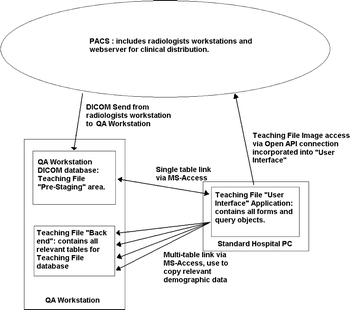
Teaching file database design. This diagram shows the physical relationships between the PACS, the QA Workstation DICOM database, the teaching file back-end, and the teaching file user interface application database components.
Creating a Case File
To send a case to the teaching file, one performs a DICOM send to the QA work station. By setting up this as a send destination on the radiologist work stations, the tagging of potential cases for the teaching file is easily incorporated into their day-to-day duties. The QA work station has been configured so that any DICOM data sent to it from the PACS (ie, via a radiologist’s work station) will be automatically placed in a separate, and hidden, folder. This allows the QA work station to continue its normal day-to-day operations running a film digitizer without its normal database showing the extra information being sent by the radiologists. Image files placed on the QA work station are not yet part of the teaching file and will stay in this staging area until a radiologists accesses the list of data to be reviewed, and then, completes the case and submits it to the teaching file.
The radiologists in the Medical Imaging Department use hospital-issued PCs that have a range of Microsoft applications including Microsoft Access. On each of these PCs, the user interface of teaching file application has been loaded. As previously described, this teaching-file component has no data tables, but instead, it is the graphical user interface (GUI) comprised of multiple forms that are linked both to the teaching file back-end and to the DICOM database of the QA work station. Figure 1 shows the links between these database components. The user interface is used to complete cases that are awaiting submission, to interrogate the teaching file, and to facilitate display of image data from the teaching file.
To complete an outstanding case that has been sent to the QA work station staging area, the user starts the user interface application and opens the form showing all cases awaiting completion. Figure 2 shows a screen capture of this form. This is a list of all the patients stored on the QA work station’s staging area. As the patients of interest were stored in a separate and hidden folder on the QA work station, the patient list displayed through the GUI shows only the patients of interest and none of the other patient data that maybe on the QA work station due to its normal day-to-day operation. When a case is selected via the GUI, a case form opens and allows the user to edit the remaining appropriate fields. These fields contain all of the clinical information not supplied by the DICOM header—including diagnosis category, body system affected, clinical notes, other imaging modalities used, differential diagnoses, and the ability to assign the case to individual presenters/authors or to specific teaching collections. The diagnosis category, body system, presenter, and teaching category fields are entered via drop down menus, the other imaging modalities are entered by a series of radio buttons, and the clinical notes and differential diagnoses are free text fields entered by the case author. Figure 3 shows a screen capture of this page. When this form is opened, the user interface automatically propagates the fields patient name, patient medical record number (MRN), patient date of birth, patient sex, exam accession number, and exam study date from the DICOM information stored within the staging area. The remaining fields relate to the appropriate ACR coding of the image case and relevant comments pertaining to the case. The ACR codes are generated from the diagnosis category and body system selections. On the case submission page, buttons are provided on the graphic interface that will automatically display the relevant images from the PACS on the PC using a connection to the PACS webserver or open the patient pathology or radiology results on the hospital’s clinical integration system (CIS). The hospital CIS is a web-based product that is used to allow hospital clinical users to access Radiology and Pathology textual results. The CIS can be accessed from the case file creation form by linking a simple URL string call to the appropriate button on the form. Access to the CIS allows the teaching case file to be supplemented with clinical data that is easily copied and pasted using the Windows Clipboard function from the relevant text fields within the CIS.
Fig. 2.
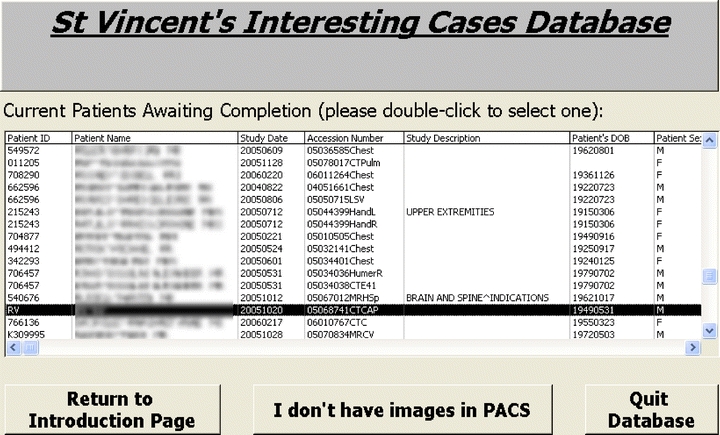
A view of cases awaiting completion, ie, cases still residing on the QA workstation DICOM database.
Fig. 3.
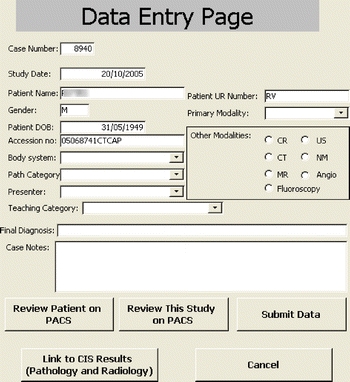
Case submission form.
When the case is completed and then “submitted”, the user interface application initiates a process where the information in the staging area on the QA work station DICOM database is deleted. To do this, a script in the user interface determines the image filename as listed in the QA work station DICOM database, goes to the appropriate directory, and deletes the image data, the original demographic data in the DICOM database and also the folder in which the DICOM images were stored. This process helps maintain the prestaging area of the teaching file and also helps protect the QA work station from performance degradation due to an excessive amount of data being stored on the computer.
Access to Image Data
Because the teaching file takes advantage of the open API that is part of the GE centricity web product, the design of this database allows the teaching file to be “imageless.” All the appropriate information for using the open API is copied from the DICOM database from the staging area on the QA work station during the case submission process. The open API allows the user to pass a command string to the webserver that will log a specified user in and then perform an action such as opening a specified examination. If the accession number is used within this command string, then, a specific study for a given patient will be displayed. If only the medical record number is used within the command string, then, the whole patient jacket will be accessed. By creating hypertext links within the teaching file application that pass on an appropriately constructed command string, a fully integrated image link can be constructed. The image data being displayed via the PACS webserver is at the full bit-depth as acquired, and the technology being used to display it is exactly the same as what is used throughout the hospital for clinical display.
This open API link is used to access image data during the case submission process and when specific cases from the teaching file are being reviewed. Figure 4 shows a screen capture of a CT image being displayed via the open API connection. The web browser window is initiated as an object within the Microsoft Access form. This object has full web browser functionality; however, this is contained within the MS Access program.
Fig. 4.
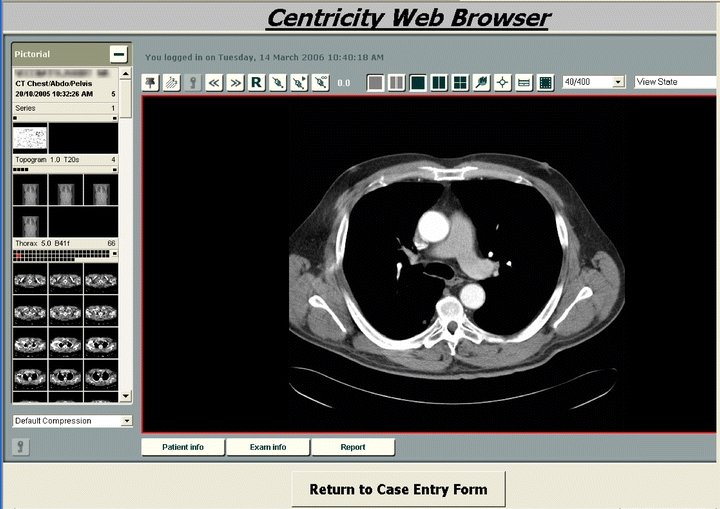
Images via Open API connection to PACS webserver.
There were several reasons for choosing this method of image display. Firstly, this display method meant that the radiologist does not have to spend time creating Joint Photographic Experts Group (JPEG) or TIFF images from the original data, which simplifies the case submission process. Secondly, this method allows access to the full patient imaging history, allowing easy navigation to imaging performed either before or subsequent to the case of interest, or complementary imaging performed by other modalities. The third reason for using the open API method was that it was, in fact, easier to implement this within a Microsoft Access database, rather than trying to create a stand-alone DICOM viewer that would display relevant DICOM images from the QA work station.
Using the Teaching File for Case Review
To use the teaching file for case review or to search for a specific anatomy/pathology mix, the user opens the teaching file search form in the user interface application. Figure 5 shows a screen capture of this form and the fields presented for searching. The search fields support wild card fields, which is very useful for searching the case diagnosis or notes. When a search is performed, a results list is produced. Figure 6 shows a screen capture of a typical results list produced for all CT cases on the teaching file.
Fig. 5.
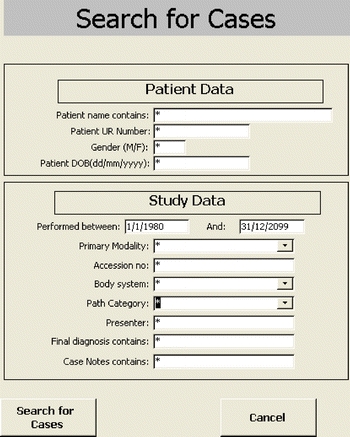
Teaching file search form.
Fig. 6.
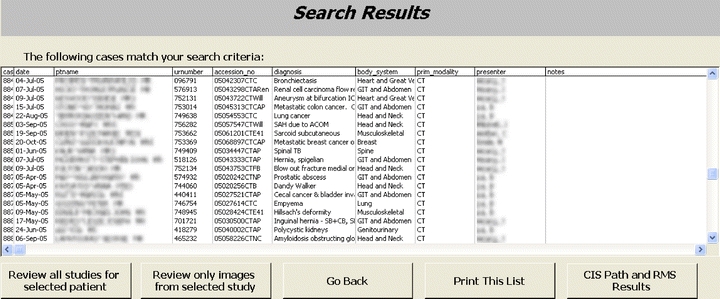
Teaching file results page.
The results list allows the user to open a case of interest, reviewing its images, or review all studies for the patient relating to that case. The user can also open the case to review the case notes and final diagnosis, or the user can print the complete list out for future reference.
Discussion
When designing this teaching file, several criteria were defined. These criteria were: it had to fit into existing radiologists workflow, as much demographic data as possible had to be automatically copied to reduce case submission time, the teaching file had to be able to support multiple users at any given time, the users had to be able to easily query the database on any one or more database fields, and developing the database must not incur any additional expense. All of these criteria were met using the described implementation. There are many benefits from this design. These include the ease of use for submitting radiologists, the teaching file integration to the PACS allows quick access to the full imaging history of the patient of interest using a commercial PACS webserver, the separate back-end database component is relatively small allowing the teaching file to be easily backed-up and the use of the user interface application allowing multiple user access.
The benefits of the ease of use of this system for the submitting radiologists come from several areas. For the submitting radiologist, the initial step of the case submission process is performed as a DICOM send which causes no interruption to their day-to-day reporting duties. Then, the use of the staging area on the QA work station helps provide a list where the radiologists can quickly see which cases need to be completed and submitted to the teaching file. This has the potential to reduce the number of incomplete cases that exist within the teaching file. Finally, as the teaching file has been linked to the staging area on the QA work station, the patient demographic and exam information has already been propagated to the case submission form. This has the potential to reduce the case submission time for the case author and has the potential to reduce errors caused from mistyping patient demographic details.
A unique benefit of this teaching file over any other reported is that even though the file does not directly contain images, the use of the open API connection to the PACS webserver gives unprecedented access to image data not normally encountered in a teaching file. Access to the complete imaging history, from all imaging modalities, is one of the major strengths of PACS. Including this level of access in a teaching file should be considered a major benefit, as access to this data can enhance a radiologist’s learning process when examining a particular pathology within a particular teaching case. By taking advantage of the functionality of the PACS web server, the users can access preassigned significant images relating to a case of interest or review the complete imaging series for particular examination, or more significantly, any historical imaging to the case and to any subsequent imaging after the case had been identified. As the whole patient file can be accessed, the users are given the opportunity to view the same pathology on multiple modalities if the imaging has been performed. As the user is directly using the PACS web browser application, they have access to the same image manipulation tools as other clinical users. These include the ability to change the windowing on an image, to magnify and zoom an image and to perform physical measurements on the image. Another advantage of using the PACS web browser application is that the radiologists can still export the images in a TIF or JPEG format from the web browser to the local hard drive, if a specific case presentation is being made for use off-campus.
One of the benefit’s derived from the separation of the database content from the user interface application is that the resultant back-end database that contains all the valuable demographic data of the teaching file can be easily backed-up to a CD volume or restored from that backup. This is because this database component exists as a separate entity located on one computer, and it only contains textual information making it relatively small. The physical size of the user interface application is less than one Megabyte (848 kB) and the physical size of the back-end database is currently 3.4 MB for a database holding all the relevant demographic data for 1,559 cases.
Another benefit derived from the database design is the use of the user interface application allowing multiple users to access the database at any one time. It had been noted that the only way that our MS-Access database would easily support multiple users was to split the database into a front end and a back-end. Each front-end database instance can access the tables in the back end, but their access does not lock the table to other users. Entries can be edited and viewed simultaneously without interfering with the functionality of the other users. Another benefit using the user interface application separate from the content of the database is it allows the application to run on computers with very high computer security settings. It had been observed that if a database contains tables that are being edited, the local security settings of the computer and of the user logged on can affect the ability of the user to save any changes they have made. As the user interface does not contain any of the demographic or image-related data, the content of the user interface never changes when a case is added to the teaching file or a query is performed upon the teaching file. Because the content of the user interface application is never changed, problems relating to security permissions for individual users on the hospital PCs are not encountered. This was found to be very useful in our hospital environment where all computers are set on very high security to avoid users loading malware and to help avoid virus propagation. A final benefit of the use of this user interface application is that it can also be upgraded or modified without affecting or compromising the data stored in the teaching-file back-end.
Like many teaching file databases developed by individual centers, this database has deficiencies. These include controlling the number of cases awaiting review before completing the submission process, the inclusion of patient names and identifying demographics in the database, difficulty in creating or exporting cases to CD for students to take away with them, and the inability to share data with other institutions.
A fundamental expectation on the use of this teaching file is that the radiologists sending exams of interest to the staging area of the QA work station will complete the case submission process in a timely matter. If this does not happen, the backlog of cases in the staging area can increase to unmanageable size. There is currently no mechanism to send individuals reminders of specific cases or to arbitrarily control the number of cases awaiting submission. To date, this has not been an issue, but if it did occur, it is proposed that a 30-day holding period be established on the staging area, with studies automatically deleted after this period of time.
Like the United States, Australia has developed laws to protect the privacy of patient health records. Ideally, a teaching file should have all patient data anonymized to protect patient confidentiality. This has not been done for the current design of this teaching file. The main reason behind this is that for the open API connection to work, at least the patient MRN and accession number need to be preserved to make the connection to the PACS webserver. Some thought was given for coded display of these items, however, this would serve little purpose because when the images are displayed from the PACS webserver, they automatically have patient identifying data displayed. Within the hospital, there are many precedence’s of computer databases in which patient demographics are stored. The contents of these databases are used for many functions including clinical management of the patient, teaching of clinical staff, and for research. All hospital clinical staff are authorized to view all patient data. In this context, use of patient demographics within the teaching file database does not breach patient confidentiality so long as its use remains within the hospital.
Currently, the automatic creation of CDs containing patient images directly from the teaching file database cannot be achieved. Because the image data is stored within the PACS, it is difficult to pick a specific teaching file case and export it with all appropriate images to some form of removable media such as CD. Some thought was given to setting up a DICOM query/retrieve process, but our attempts to make this automated were not successful. Currently, users of the database can produce a printout of the cases of interest, and this can be used in conjunction with individual CDs printed from the PACS.
It would be remiss to discuss a teaching file database without mentioning the Medical Imaging Resource Center (MIRC) and how our database relates to the MIRC. The MIRC represents an initiative by the Radiological Society of North America to promote standards in the creation and exchange of teaching file cases.7 Through these standards, a set of input fields are defined, so that the case can then be shared with other centers, in an expected format. As this teaching file has been developed outside of these standards, it currently would not meet the requirements of the MIRC, but it does have many common variables. Due to the issues of patient confidentiality as previous discussed and the need for a in-house teaching database, it was felt unnecessary to adhere to the MIRC standards at this stage of development.
With these deficiencies in mind, this teaching file database is still undergoing development. One potential area of development is changing from using MS-Access to a mySQL http://www.mysql.com/) based teaching file with interfacing performed by PHP http://www.php.net/) scripting. MySQL is a freely distributed, fast, and robust database management system and in conjunction with the programming language PHP, allows for multiple user access to data through simple HTML web pages. This will remove the need to load a specialized user interface application, as the webserver will supply the necessary components. In conjunction with this, when the teaching file becomes completely web based, then there will be an increased need to develop a technique for auto-anonymizing the patient data and to conform to the MIRC standard.
Conclusion
Using the available technology included with a GE Centricity PACS and Microsoft Access, an integrated teaching file has been developed. This teaching file is unique in that it does not store any images within the database of the teaching file. Instead, images are accessed using the open API feature available on the centricity web. Using this feature, images are displayed within the database using the accession number of the desired study or the MRN if the full patient jacket is desired. As no image data is being stored locally within the database, the actual database size is small and allows quick and easy backup procedures. Disadvantages with this design is that the creation of CD volumes is not automatic, and the database and the associated image data are not easily shared for parties outside the immediate hospital environment.
Acknowledgements
The authors wish to acknowledge the support and input from Professor O. Hennessey, Dr. N. Liddell, Dr. P. Smith and Dr. J. Hoang from the Medical Imaging Department of St. Vincent’s Hospital.
References
- 1.Lim CCT, Yang GL, Nowinski WL, Hui F. Medical image resource center-making electronic teaching files from PACS. J Digit Imaging. 2003;16:331–336. doi: 10.1007/s10278-003-1660-0. [DOI] [PMC free article] [PubMed] [Google Scholar]
- 2.Richardson ML, Gillespy T. An Inexpensive Computer-Based Digital Imaging Teaching File. Am J Roentgenol. 1993;160:1299–1301. doi: 10.2214/ajr.160.6.8498237. [DOI] [PubMed] [Google Scholar]
- 3.Tran THD, Roach NA, O’Kane PL, Thune M. Creating a digital radiographic teaching file and database using PC and common software. Am J Roentgenol. 2000;175:325–327. doi: 10.2214/ajr.175.2.1750325. [DOI] [PubMed] [Google Scholar]
- 4.Rosset A, Ratib O, Geissbuhler A, Vallee JP. Integration of a multimedia teaching and reference database in a PACS environment. Radiographics. 2002;22:1567–1577. doi: 10.1148/rg.226025058. [DOI] [PubMed] [Google Scholar]
- 5.Henderson B, Camorlinga S, DeGagne JC. A cost-effective web-based teaching file system. J Digit Imaging. 2004;17:87–91. doi: 10.1007/s10278-004-1001-y. [DOI] [PMC free article] [PubMed] [Google Scholar]
- 6.Ernst RD, Baumgartner BR, Tamm EP, Torres WE. Development of a teaching file by using a DICOM database. Radiographics. 2002;22:217–221. doi: 10.1148/radiographics.22.1.g02ja10217. [DOI] [PubMed] [Google Scholar]
- 7.Mongkolwat P, Bhalodia P, Makori A, Gehl J, Kogan A, Channin D. Integrating MIRC-compliant semi automated teaching files into PACS work flow. Radiographics. 2005;25:543–548. doi: 10.1148/rg.252045061. [DOI] [PubMed] [Google Scholar]